
Si tienes un blog en WordPress y quieres mostar los últimos comentarios, tal y como lo tengo en este blog…
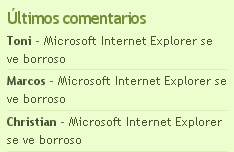
…solo tienes que añadir este código en el fichero sidebar.php en el lugar que quieras que aparezcan.
<?php
 if( $comments = $wpdb->get_results(
   "SELECT comment_author, comment_author_url,
    comment_ID, comment_post_ID
   FROM $wpdb->comments
   WHERE comment_approved = '1'
   ORDER BY comment_date_gmt DESC LIMIT 15") ) :
?>
 <li><h2>Últimos comentarios</h2>
  <ul>
   <?php
    global $comment;
    foreach ($comments as $comment) {
     echo '<li><b>'
. get_comment_author_link() . '</b> - '
. '<a href="' . get_permalink($comment->comment_post_ID)
. '#comment-' . $comment->comment_ID . '">'
. get_the_title($comment->comment_post_ID)
. '</a></li>';
    }
   ?>
  </ul>
 </li>
<?php endif; ?>
Vía: Piedra-Papel-Tijera
Genial, muchas gracias, me ha sido muy útil, lo acabo de implantar en mi blog y va perfecto.
Muchas gracias por compartir el conocimiento. Acabo de modificar el sidebar de mi blog y queda de maravilla.
Saludos
Ha funcionado a la perfección. Gracias!
Gracias Pere,
Frue de gran utilidad para mi…!!
Merece un 10 =)
Oye muchas gracias por este aporte, yo tenia puesto otro codigo:
comments
LEFT OUTER JOIN $wpdb->posts ON ($wpdb->comments.comment_post_ID =
$wpdb->posts.ID)
WHERE comment_approved = ‘1’ AND comment_type = ” AND
post_password = ”
ORDER BY comment_date_gmt DESC
LIMIT 10″;
$comments = $wpdb->get_results($sql);
$output = $pre_HTML;
$output .= “\n”;
foreach ($comments as $comment) {
$output .= “\n“.strip_tags($comment->comment_author)
.”: ” . “ID) .
“#comment-” . $comment->comment_ID . “\” title=\”on ” .
$comment->post_title . “\”>” . strip_tags($comment->com_excerpt)
.”“;
}
$output .= “\n”;
$output .= $post_HTML;
echo $output;?>
pero este que tu publicaste esta mucho mejor, lo e puesto en mi blog si quieres pasate para verlo 😉